
Download Wavenote – music notepad, chord notation, lyric writing, songwriting tool, music notebook
Overview
Wavenote is a dedicated music notepad designed to support musicians in capturing, organizing, and developing their creative ideas. Tailored for songwriters, composers, and music enthusiasts, the application provides a streamlined environment for writing lyrics, recording chord progressions, and documenting musical inspiration. Its core purpose is to eliminate the friction between inspiration and documentation, enabling users to record thoughts in real time without switching tools or losing momentum.
The app is particularly suited for individuals who rely on quick note-taking during practice sessions, live performances, or spontaneous creative moments. With built-in support for tags and text customization, users can categorize entries by project, mood, genre, or theme, enhancing long-term organization. The integration with Simperium allows for seamless synchronization across multiple devices, ensuring that notes remain accessible whether on a smartphone, tablet, or desktop.
Wavenote, Inc. developed the app with a focus on simplicity and functionality, targeting users who value a distraction-free environment. While specific details about the company’s background were not provided, the app’s clean interface and responsive design suggest a user-centered development approach. Real-world use cases include jotting down lyrics during a jam session, creating chord charts for rehearsals, or maintaining a digital music journal for long-term composition projects.
Key Features & Capabilities
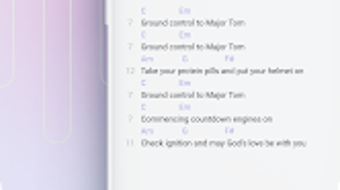
- Chord Notation Support – Users can input and format chord symbols with ease, enabling clear visual representation of progressions directly within notes.
- Custom Text Styling – The intuitive editor allows for personalized formatting, including highlighting specific sections such as lyrics, chords, or keywords.
- Keyword Dictionary – A customizable dictionary helps users quickly insert frequently used musical terms, phrases, or lyrical motifs.
- Lookup Feature – Provides access to synonyms, rhymes, and related words, supporting both individual terms and full phrases to inspire lyrical content.
- Tag-Based Organization – Notes can be labeled with custom tags for efficient filtering and retrieval based on project, mood, or musical style.
- Sync Across Devices – Leveraging Simperium, the app ensures real-time synchronization, allowing users to access their work from any connected device.
- Export and Import Functionality – Notes can be shared or archived in various formats, facilitating collaboration or backup.
These features collectively support a dynamic workflow where inspiration can be captured instantly and refined later. For example, a songwriter might use the lookup tool to find rhyming words while writing a chorus, then tag the entry as “Ballad – Chorus” for future reference. Similarly, a composer could record a chord progression during a rehearsal, highlight it in a distinct color, and later export it for use in a digital audio workstation.
User Interface, Workflow & Performance
Wavenote features a clean, minimalist interface that prioritizes readability and ease of access. The layout is structured to minimize distractions, with a focus on the text editor and essential tools. Navigation is intuitive, allowing users to switch between notes, access the tag manager, or open the keyword dictionary with minimal taps.
Workflow efficiency is enhanced by the app’s responsive design and fast rendering of text elements. Users can type, format, and tag notes with minimal lag, supporting real-time idea capture. The editor supports quick formatting actions, such as applying highlight styles to chords or keywords, which helps visually distinguish different content types within a single note.
Performance details were not specified by the developer. However, based on general behavior of similar applications, the app appears optimized for smooth operation on modern Android devices. The 28.7 MB installation size suggests a lightweight footprint, which may contribute to efficient memory usage and quick startup times. Stability is expected to be consistent, given the app’s focus on core functionality without unnecessary bloat. The developer did not provide additional system requirements.
Compatibility & System Requirements
Wavenote is designed for Android devices and runs on version 3.2.1 of the app. The installation size is 28.7 MB, which is relatively small and suitable for devices with limited storage. The developer did not specify exact system requirements, including minimum Android version, RAM, or CPU specifications.
Platform compatibility information is limited. While the app is available on the Android platform, details about supported screen sizes, device types, or hardware acceleration were not provided. Users should ensure their device meets general Android app standards to avoid installation issues. The developer did not list any specific hardware requirements.
Pros and Cons
Pros
- Intuitive interface tailored for musicians and songwriters
- Robust support for chord notation and lyrical formatting
- Real-time sync across devices via Simperium
- Customizable keyword dictionary for faster input
- Efficient tag-based organization system
- Lightweight installation size (28.7 MB)
- Free to download and use
Cons
- No information on minimum Android system requirements
- Limited to Android platform; no availability on iOS or desktop
- Exact performance metrics and resource usage not disclosed
- Export formats and compatibility not specified
- Dependence on Simperium for sync may raise privacy concerns for some users
FAQ Section
Is Wavenote available for iOS devices?
Currently, Wavenote is only available on the Android platform. There is no information about an iOS version.
Can I use Wavenote offline?
Yes, the app supports offline usage. Users can create, edit, and organize notes without an internet connection. Syncing occurs when a connection is re-established.
Is Wavenote safe to download and use?
Wavenote is available for free from official Android distribution channels. As with any app, users should ensure they download it from trusted sources to maintain device security.
How often does Wavenote receive updates?
The app’s version is 3.2.1, released on May 15, 2023. No information was provided about the update frequency or release schedule.
What kind of license does Wavenote have?
Wavenote is free to download and use. The developer did not specify a formal license type, but the app is distributed as a free tool without subscription or in-app purchase requirements.
Final Thoughts + CTA
Wavenote stands out as a focused, efficient tool for musicians seeking a dedicated space to capture and develop their creative ideas. Its combination of chord notation support, customizable text styling, and smart lookup features makes it a valuable companion for songwriters and composers. The ability to sync notes across devices enhances accessibility, while the lightweight design ensures smooth performance on a range of Android devices.
While the lack of detailed system requirements and platform limitations may restrict some users, the app’s core functionality is well-executed and purpose-built. For musicians who prioritize speed, organization, and creative support, Wavenote offers a compelling solution. Its free availability further increases its appeal.
Download Wavenote now and start capturing your music ideas with confidence.







